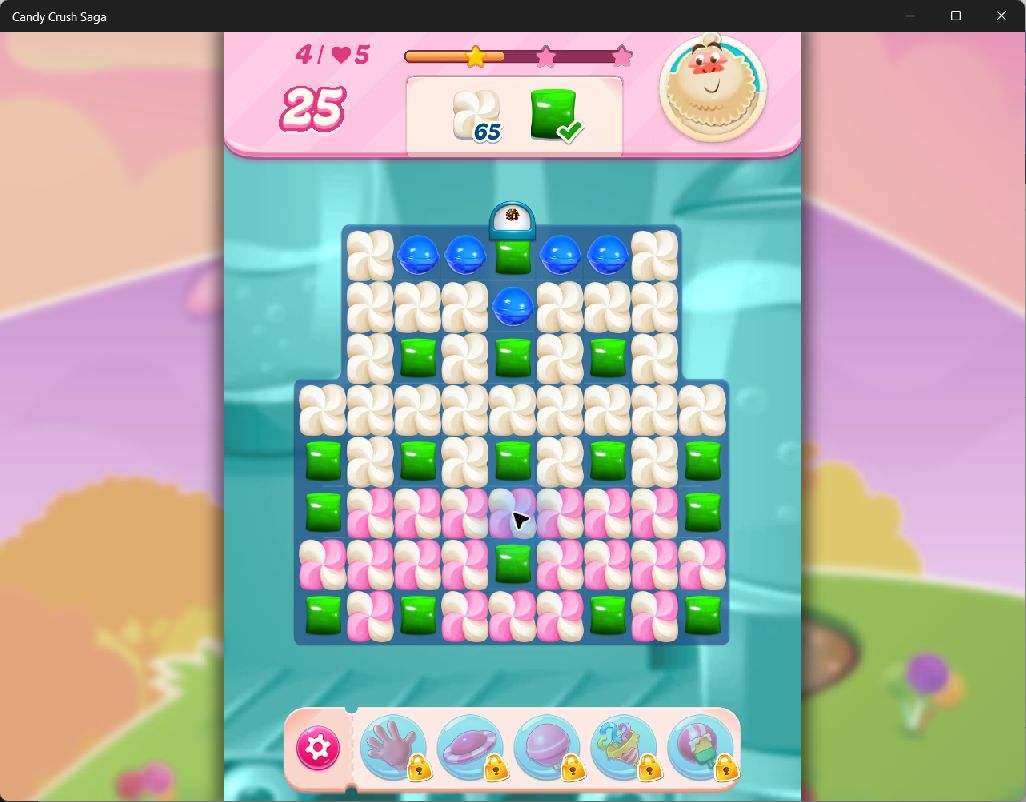
Finish a blue, green or frosting goal with one action. Make the board tiny, giant, tall or sideways, then set the pace with slow motion, fast play or frozen time.
Green goal completed after a fresh game launch; frosting remains at 65. Microsoft Store 1.3390.1.0 on Windows.
Features
Complete blue, green and frosting goals
Copy the current required count into collected with Complete blue goal, Complete green goal or Complete frosting goal. The game handles the result: verified trials triggered Sugar Crush or the native celebration and returned to the map.
Set goal requirements and progress
Change the supported goal’s required or collected count. Required accepts 1–1,000,000 and stays at least as high as collected; collected stays between zero and required. A goal that is absent or ambiguous is unavailable.
Tiny, giant, pancake and tall candies
Change the shape of populated render slots while preserving their board positions. Normal shape resets available cells. The tall preset and its restoration passed through the customer Offset build. Normal matching passed with tiny and tall boards in the named native trials.
Tilted and sideways candies
Rotate candy parents with the board-wide angle presets, then return them upright. Shape and angle actions support up to 128 slots and skip empty cells.
Control the simulation pace
Choose frozen time, cinematic 0.05×, slow 0.25×, normal 1× or fast 2×. Native measurements verified frozen time, 0.05×, 0.25× and 2×, with normal speed restored. Quarter speed (0.25×) also passed after a game restart.
Desktop and floating controls
Use the imported panel in Offset or its floating controls window. The 420-pixel layout fits goal fields and Apply buttons; use its scrollbar to reach the remaining actions.
Installation
Match your game version. Use the Microsoft Store Windows x64 build listed above. Keep a backup of progression you want to preserve.
Open the Offset panel. Open panel.json through Open table or panel (Ctrl+O), select candycrushsaga.exe and explicitly attach. Loading the documents performs no action and activates no holds.
Open a level and choose a control. Blue, green and frosting fields become available only when their matching goal is present. Use table.json for the same entries in the Entries view.
To use floating controls, open Controls and enable Overlay. Choose Show overlay if the window is hidden. Use the scrollbar for lower actions and Hide to return to the game. This pack uses the desktop controls; no companion DLL is required.
Compatibility
Candy Workshop 1.1.0 targets Microsoft Store game 1.3390.1.0 on Windows x64. The table checks the executable build identity and resolves the current board again. Green-goal checks covered requirement and progress edits, normal matching and completion, replay, and a fresh game process. On level 4, completing green left the separate frosting goal untouched. Completing frosting then opened level 5, which remained available after restart. Goal counts reset to the level definition on a new attempt.
Limits
Blue collection, green collection and frosting are the supported goal types. Completing one goal does not establish completion of every goal on a level. Goal actions can advance normal gameplay and saved progression, and have no Hold or byte Undo. Visual Undo restores one changed cell per click; a native check restored one cell while the other 48 stayed tall. Normal shape and Upright candies reset the available visual slots. Visual restoration does not rewind matches or progression.
Extra moves, direct score edits, currency, boosters, paid inventory and arbitrary level or content unlocks are outside this release. This pack adds the controls listed above; it does not unlock the whole game. A game update can require a new pack.
Validation scope
The final 263-entry panel was imported and its readouts checked in customer Offset 0.1.2, retaining a previously explicit game attachment. Green edits and completion used the existing guarded table resolver through a developer tool. This checkpoint does not establish a new green-button or floating-window activation trial. Earlier blue, frosting, timing and visual controls retain their named acceptance evidence; full details are included in the pack.
Download contents
The download contains panel.json, table.json, instructions, acceptance notes, a version manifest and SHA256 checksums. There is no standalone executable, DLL or script.
ZIP SHA256 46f882fbc5946b22d70609d78bcc6af8e0d7c9a1ac2f7dbfff229110d3c21942.
Questions
Does this give extra moves or gold?
No. Candy Workshop 1.1.0 changes supported blue, green and frosting goals, candy shapes and angles, and simulation speed. Move counters, gold and paid inventory are outside its supported controls.
Can the goal buttons complete every level?
The buttons complete the current blue collection, green collection or frosting goal by copying its actual requirement into collected. Complete each supported goal separately on a multi-goal level. Other goal types are outside this pack. The game remains responsible for its normal completion flow.
Will the controls find a replayed board?
The current board is resolved again when you apply an action. Native checks covered normal replay and a fresh game process for the named controls. This does not make another game version compatible.
Get Offset
Open versioned cheat tables, use custom controls and build your own panels. US$69 for a lifetime licence, with future updates and no subscription.