Upgrade one weapon
Read your owned inventory, choose an iconic weapon and confirm its name, tier and ingredient cost. Advance the selected eligible instance by one step through the game's upgrade system.
Upgrade your owned iconic weapons without spending crafting components. Inspect an individual weapon, advance it one tier, or bring eligible owned iconics to their native maximum.
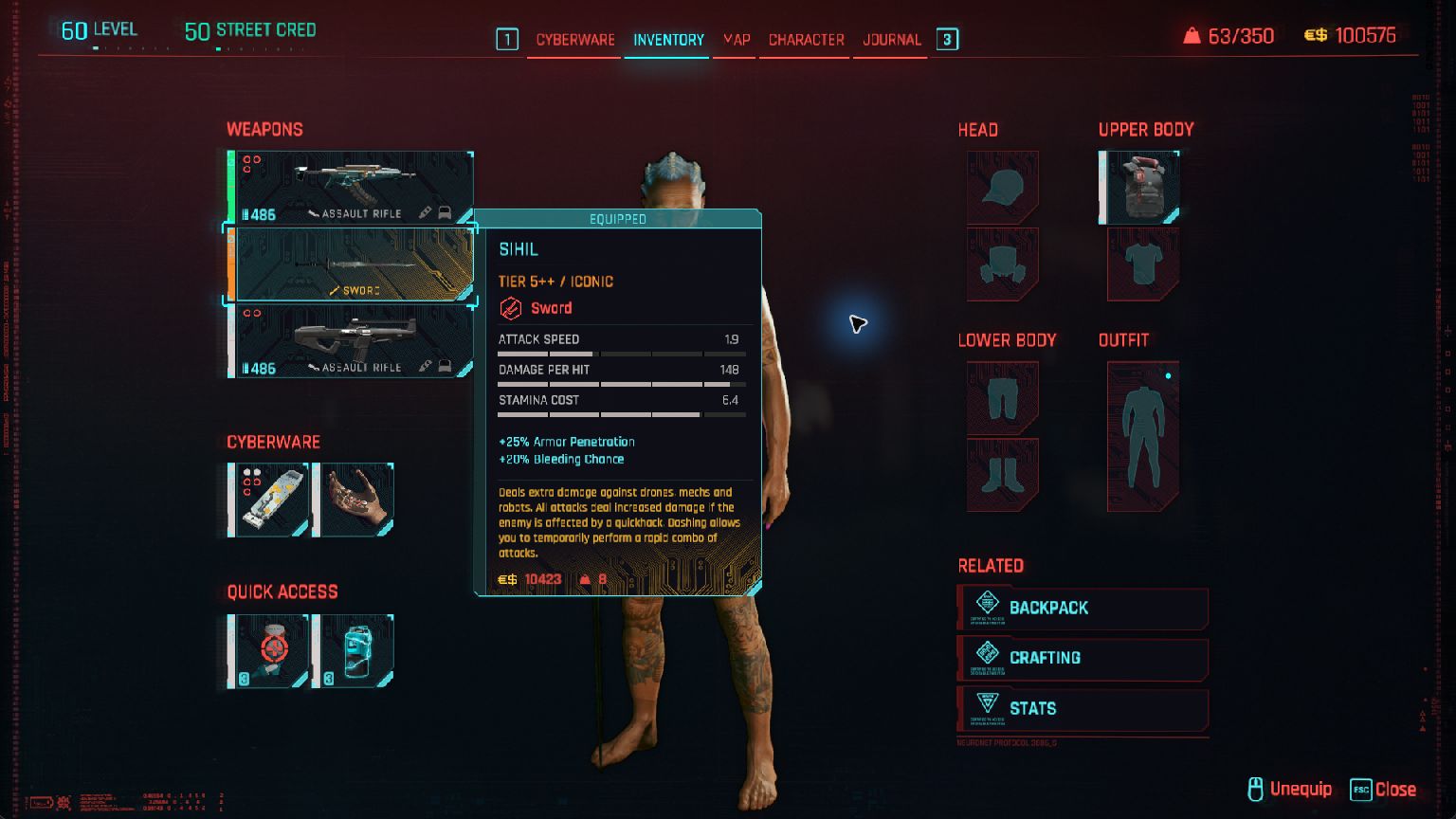
Read your owned inventory, choose an iconic weapon and confirm its name, tier and ingredient cost. Advance the selected eligible instance by one step through the game's upgrade system.
Process the captured inventory and advance eligible iconic weapons to their native maximum. The result reports completed and skipped work. Items already at their maximum are skipped.
Apply the separate upgrade-cost modifier before upgrading. Remove it afterward and refresh the game's upgrade menu to see normal prices again. Completed weapon upgrades remain in your save.
The customer Offset 0.1.3 workflow scanned 103 inventory entries and completed 17 increments across Sihil, Black Unicorn and Chaos without granting materials or changing the checked ingredient counts. All three reached Tier 5++. Their displayed damage values were 148, 148 and 49, and those tiers and displays survived saving and restarting without the companion. Actual combat damage and other iconic instances were not individually measured.
This release covers iconic weapon upgrades. The broader Cyberpunk control pack remains in development. Non-iconic and cyberware upgrades, crafting, item grants and sandbox effects are outside this download.
| Panel | Actions | Result |
|---|---|---|
| Upgrade cost | Select, preview, apply and remove the owned cost modifier. | Native fraction and ownership readouts. |
| Iconic upgrades | Read inventory, select an index, preview, upgrade once or process eligible owned iconics. | Current tier, maximum, required cost, changed work and uncertainty. |
| Session controls | Enable dispatch, inspect the current player and stop effects. | Completion, errors, partial results and unverified cleanup. |
The panels contain 48 controls in total, including labels, inputs and status. The advanced table contains the same 35 guarded entries. Imports start inactive.
Supports Cyberpunk 2077 Steam Windows x64 build 26161058, displayed version 2.5. Phantom Liberty was installed during testing. Other stores, builds, operating systems and a base-game-only installation are unverified. Requires purchased Offset 0.1.3 or later for Windows and the included matching companion.
The companion keeps native eligibility and maximum-tier rules. Jobs are limited to 4,096 inventory entries, 256 eligible iconic instances, 16 increments per instance and a 30-second deadline. A partial job can leave completed upgrades in place. Stop removes owned session effects and cancels remaining work; it cannot undo permanent upgrades, restore an older save or rewind gameplay.
After loading a different save, inspect the player again. An old-world removal can remain unverified even when the new player reads a normal value; the cleanup counter reports that distinction. On any error, partial result or uncertain upgrade, stop issuing upgrades and inspect the normal inventory. Never blindly repeat an unacknowledged request.
Game executable SHA-256: d36e74c47592e9c656ae250078cb40b2be63c782af5bfbeff2280d43e653fab4. The table also checks the matching companion's build identity. Keep all files from the same pack.
Extract the ZIP and keep its panels, table and companion together. No game-file patch or separate installer is needed.
SHA-256: 388add74a9e65eca33c8e7a627b0ce0adce692c02f469a32cf9e24c6a81702ce. The archive includes payload checksums and third-party notices.
01-Upgrade-Cost.panel.json. Attach Cyberpunk2077.exe. In Code → DLLs, choose the included OffsetCyberpunkWorkshop.dll and explicitly Load it once for that process.02-Iconic-Upgrades.panel.json. Read owned inventory, choose an index and Preview. Confirm the weapon and zero required cost before upgrading. Read completed work and errors before issuing another action.After restarting the game, attach the new process and explicitly load the matching DLL again. No DLL, script, effect or hold starts automatically when you import a panel.
Yes. These panels and tables require purchased Offset for Windows. The pack has no separate charge and includes no standalone controller.
No. This version upgrades eligible iconic weapons you already own. Cyberware, non-iconic weapons, crafting and new item grants are outside this release.
Completed upgrades are persistent. Stop restores owned session effects, including the cost modifier; it does not reverse weapon progression. Return to your preserved checkpoint to undo saved upgrades.
Initial iconic weapon upgrade table: selected single-step upgrades, eligible-owned maximum jobs, explicit upgrade-cost control and completion diagnostics. Qualified against the exact Steam 2.5 build above using customer Offset 0.1.3.
Open this pack in the Windows memory workbench. US$69 for a lifetime licence.