Tropico 6

Unlock all 21 World Wonders, from the Great Sphinx to the Eiffel Tower, and build through the normal construction menu. Grant cosmetic progression and choose the Pharaoh outfit. Jump the civil calendar to 1 January 2000, upgrade eligible owned buildings and finish construction across your island. Add cash, complete research, grant blueprints, advance a real era and make citizens happier.

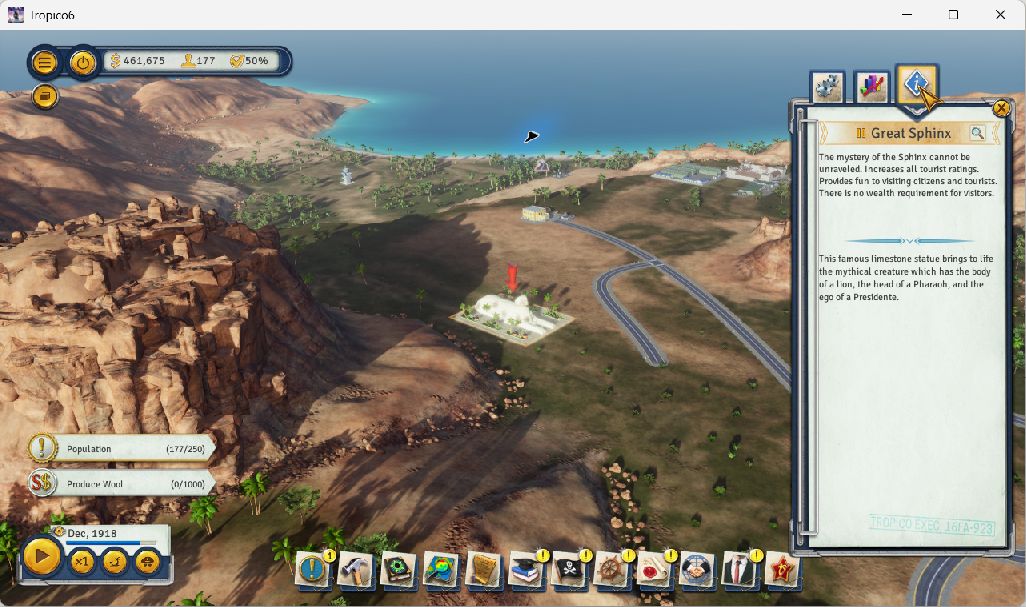
The completed Great Sphinx and its normal building information panel in Tropico 6 after saving and restarting the unlocked island.
The completed Great Sphinx after the embedded menu was disabled. Normal placement, rebuilding, saving and a clean restart retained the landmark and its service controls. Steam build 17859233 · v23(1290) on Windows.

Features

Unlock all 21 World Wonders

Remove the landmark progression locks, then select, pay for and construct World Wonders normally. All 21 catalog entries became available. The Great Sphinx was placed and built, then retained its model and working service controls after saving and restarting without the companion. Costs and placement rules remain.

Unlock cosmetic progression

Grant the game’s 25 cosmetic progression conditions, then choose appearances normally. With the earlier Director 1.2.4.0 companion, the Pharaoh outfit became usable. Its matching headdress was selected normally, and both survived a full restart. Separate era and content gates remain; the Bunker still requires World Wars.

Treasury cash and knowledge

Set island cash and knowledge totals. Spend cash on normal building purchases and upgrades, or let the research queue use your knowledge points.

Complete available research

Complete the island’s available research through the game’s own research manager. The verified island reached 112 completed research items.

Unlock building blueprints

Grant available building blueprints. The verified island reached 147 owned blueprints and placed a Bus Garage normally. Native era and content requirements remain active.

Finish selected or island-wide construction

Complete one selected owned site, or finish eligible construction across the island. The verified batch completed a Warehouse and Electric Substation; both persisted after a full game restart. Visual completion can require the next normal simulation tick.

Apply eligible owned-building upgrades

Apply eligible upgrades across the original owned-building snapshot. The verified batch applied 38 tasks without changing cash. Teamster’s Office Second Shift became owned, adding six worker positions for a total capacity of 12; that named upgrade persisted after saving and restarting without the DLL.

Jump the civil calendar

Set the island’s civil date to 1 January 2000 through its native calendar routine. Read the year, month, day and elapsed simulation days in Offset. This is a calendar change, with native notices and costs; it does not rewind island history or advance an era.

Advance a real era

Move from World Wars to Cold War, then Modern Times through normal era transitions, dialogs and constitution choices. This is era progression, with saved results.

Selected and island-wide happiness

Set a selected citizen’s native happiness components to 100, or apply the action across owned living citizens. Native life-state and job rules remain; retired citizens can skip Job happiness.

Camera and game speed

Use a wider 120-degree camera view or return camera control to the game. Choose 1×, 4× or 8× for the game’s selected 4× mode; native pause remains available.

Installation

  1. Match your game version. Check the store edition and build above, then keep backups of both your island save and local Tropico profile.
  2. Open the Offset panel. Open panel.json through Open table or panel (Ctrl+O), select Tropico6-Win64-Shipping.exe and attach. In Code → DLLs choose the included OffsetTropicoDirector.dll, explicitly Load it and wait for Ready / No error.
  3. Apply your chosen controls. Import starts inactive, without scripts or automatic holds. Use table.json for the same fields in the Entries view. Before the landmark action, open the normal World Wonders construction catalog once to let the game load its metadata.

For the main actions inside the game, enable Embedded menu in Controls. Use Ctrl+Shift+F9 to show or hide it, and Escape to hide it. The Previous button can miss a click during a live refresh. If page navigation stalls, use desktop Controls; every action is available there.

Compatibility

Island Director 1.6.0 supports Tropico 6 Steam build 17859233 · v23(1290) on Windows x64 and requires purchased Offset 0.1.3 or later. The download includes the matching Director 1.2.5.0 companion DLL, Offset panel and table, instructions and checksums. Load the matching companion explicitly after each game restart. A game update may require a new pack.

Cosmetic, calendar, upgrade, construction, research, blueprint, era and happiness results were verified with earlier Director companions. Version 1.2.5.0 retains those control definitions; only the landmark action has been rerun with it.

World Wonders

The landmark action made all 21 World Wonders available in the tested island. Great Sphinx was placed for $15,000 and completed through normal rebuilding. After a new save and full restart without the DLL, its Tourists only control changed the displayed fee from $5 to $30 and back. Actual visitors, earned revenue and a tourism-rating change were not measured; the other 20 landmarks were not individually built. Select, pay for, place, construct and save normally. The game must load the World Wonders catalog before the unlock can run. These landmark changes cannot be undone from Offset. They persisted in the tested island save; other islands and profiles were not tested.

Cosmetic unlocks

Grant the 25 cosmetic progression conditions, then choose appearances and save through the normal game menus. The command does not apply an appearance or save automatically. These profile unlocks are permanent and cannot be undone from Offset, so back up your local profile and island save first. Separate era, edition and DLC requirements remain active; the Bunker still requires World Wars.

Limits

Construction and upgrade actions apply to eligible owned buildings. Transfer-based modernization, bulk modernization and attached-building variants are excluded. Selected-upgrade actions, in-game events and disasters are outside this pack. Native building and content requirements still apply, and completed changes can persist through normal saves.

The civil-date preset sets 1 January 2000. Native calendar notices can charge money even while paused, and repeating the preset can charge again. Elapsed simulation days and island history stay unchanged. History rollback is unavailable, and this preset cannot be undone from Offset.

Releases

Companion version 1.2.5.0 · ABI 4. Pack and companion versions are distinct. ZIP SHA256 6f0e13dade7e88564ac3c55f3b777836e48be25f92691b6ad516c527c8e792ac.

Previous releases: Island Director 1.5.0 cosmetic pack, Island Director 1.4.0 calendar pack, Island Director 1.3.0 upgrade pack and Island Director 1.2.0 construction pack, each with its matching older companion.

Questions

Looking for Tropico 6 hacks or a trainer?

Island Director provides the controls listed above through Offset’s panel. Buy Offset, import the matching pack and choose the changes you want. The embedded menu puts the main actions inside the supported game view.

How do I unlock World Wonders in Tropico 6?

Open the matching Island Director panel in purchased Offset, attach to the supported game and explicitly load the included companion. Open the normal World Wonders construction catalog once to load its metadata, then choose Unlock configured landmarks in Offset and place a landmark normally. All 21 entries became available; Great Sphinx placement, construction, service controls and a clean save/restart were checked. The action does not place or build a landmark for you.

Do these Tropico 6 cheats unlock research and change eras?

Island Director completes available research, grants available building blueprints and advances one native era at a time. The verified island retained research, blueprints, Modern Times and sampled citizen happiness after a normal save/restart. Native availability and life-state rules still apply.

Do the cosmetic cheats unlock every outfit and Palace option?

The grant supplies 25 cosmetic progression conditions. With the earlier Director 1.2.4.0 companion, the Pharaoh outfit and headdress were selected normally and retained after saving and restarting. Separate era, edition and content requirements remain active: the Bunker was still locked behind World Wars. Choose appearances and save through the normal game menus.

Does the upgrade action affect every building?

It checks the current owned-building snapshot and applies eligible tasks. Unsupported modernization tasks are skipped individually while ordinary tasks on the same original continue. If a supported replacement retires an original building, its remaining tasks are skipped. Linked and other unsupported variants remain excluded.

Does changing the date rewind my island?

No. The preset changes the civil calendar through the game’s native routine. It leaves elapsed simulation days unchanged and does not reverse research, upgrades, spending or history. Calendar callbacks can charge money while paused. Use an existing backup to restore an earlier island state.

Will the table survive a game restart?

Offset resolves the current game objects again instead of reusing a previous heap address. Explicitly load the matching companion again after a game restart before using its actions. These controls target the exact build listed above. Loading a different build requires a compatible pack; stable resolution does not make game updates interchangeable.
Get Offset

Open versioned cheat tables, use custom controls and build your own panels. US$69 for a lifetime licence, with future updates and no subscription.

Five active devices. Plus applicable tax. Requirements and licence.