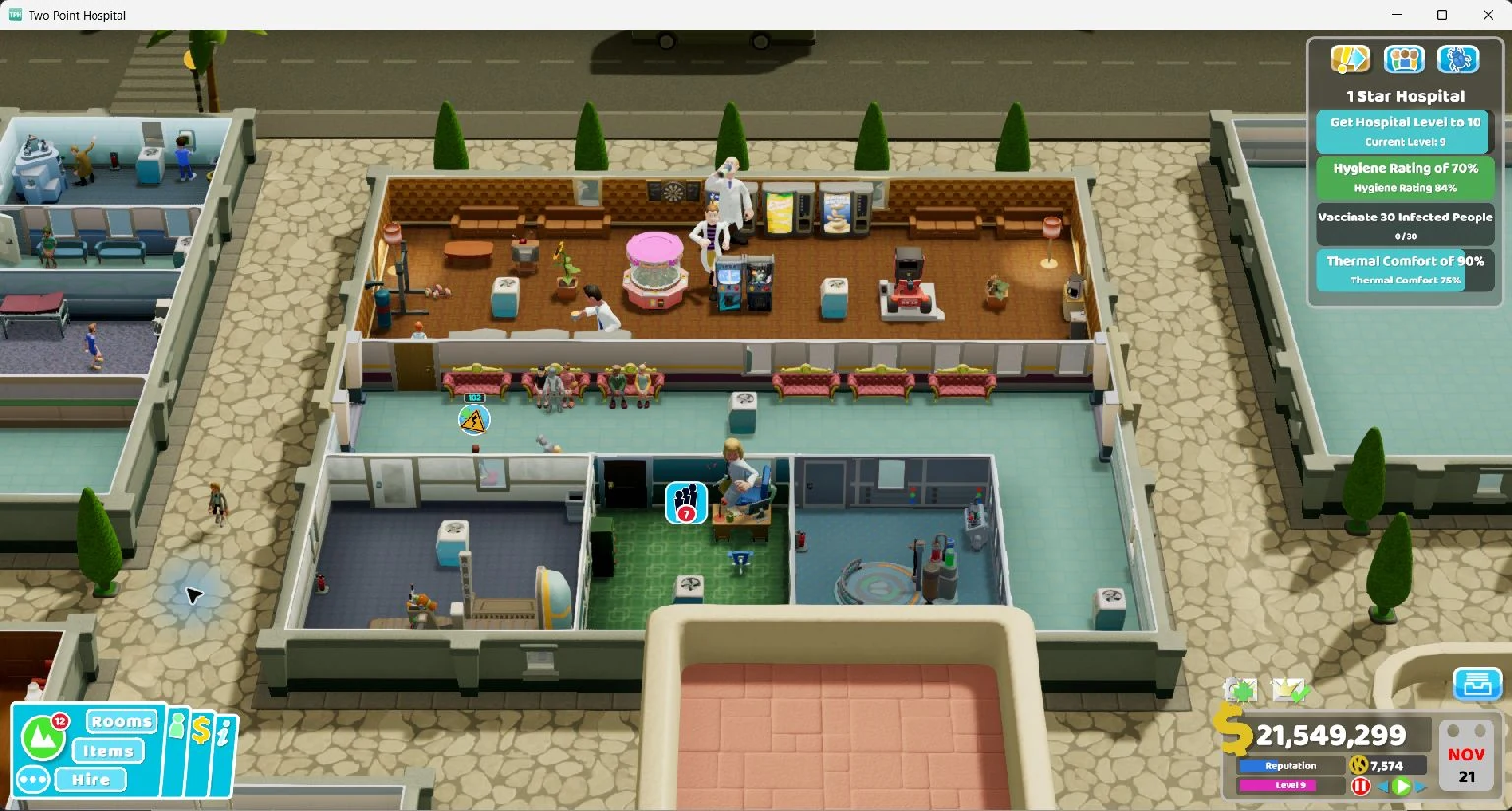
Edit individual staff, care for patients and repair or reskin equipment. Change the whole hospital with one-shot actions, then send in a parade of prop doctors.
Giant doctors at twice their usual visual size, retaining their normal movement and jobs. Two Point Hospital 1.30.0 on Windows.
Features
These mods use the game's own character, training, recruitment and equipment systems. Click a person or item in the game and confirm its name in Offset for individual edits, or choose a staff group or hospital-wide action.
Staff academy
Promote staff to your chosen rank, finish unfinished study and fill available slots with valid qualifications. Undo is available while their progression still matches the academy result; later experience, promotion or training is preserved.
Custom recruitment
Create a doctor, nurse, assistant or janitor at your chosen rank. Applicants appear in the normal Hire menu, with game-generated names, appearances and qualifications. Recruit through the panel or hire them in-game.
Prop doctors
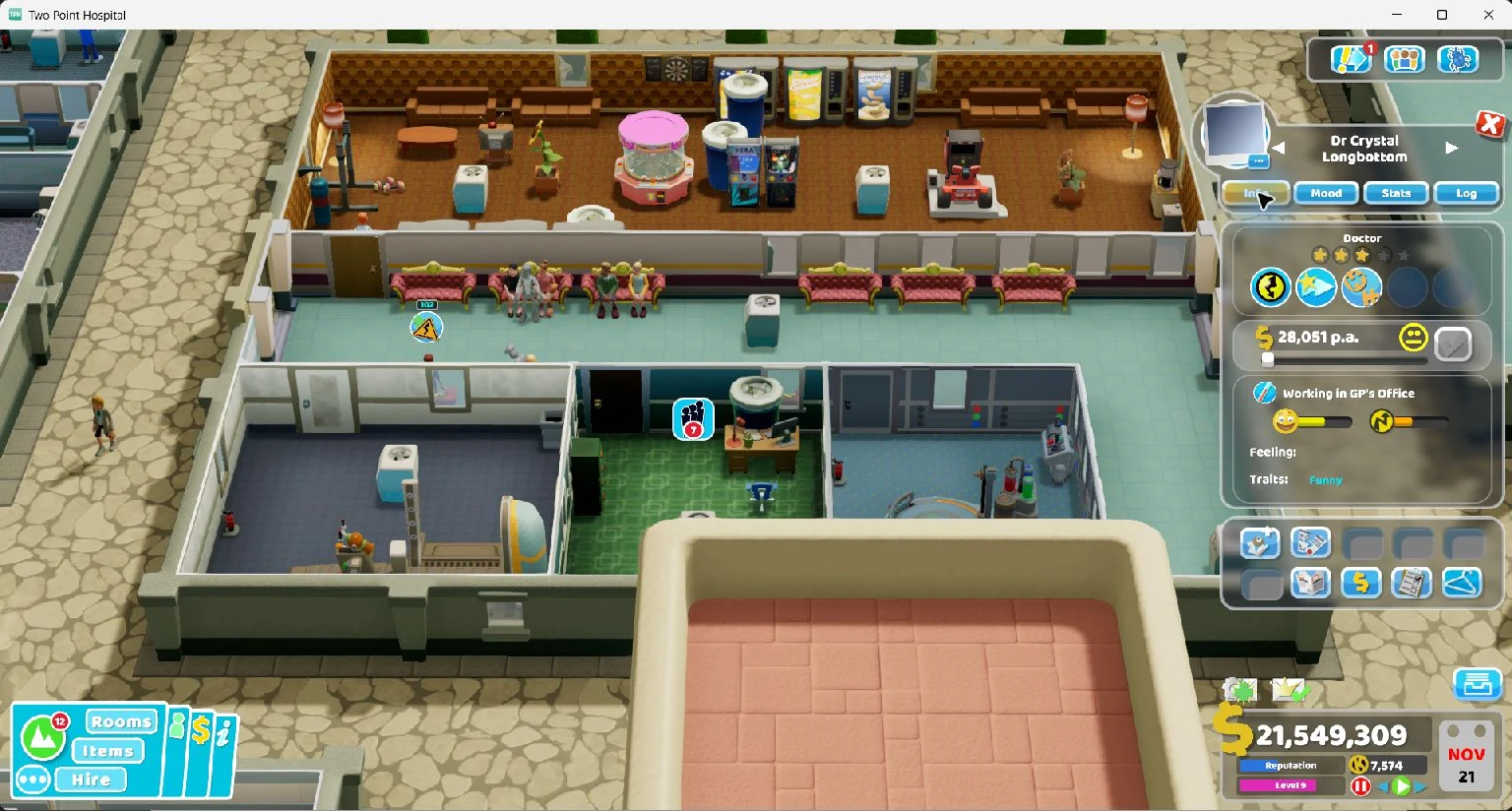
Turn staff into plants, bins, vending machines or chairs while retaining the staff member's movement and job. Use a catalogue index for other props from the loaded hospital, and restore their original appearance with one action.
Mixed prop parade
Transform a group into a mix of the available plant, bin, vending and chair disguises. Your hospital keeps working with a team disguised as everyday objects.
Tiny and giant staff
Shrink staff to 45% of their usual visual size or grow them to twice their size. Their normal movement and jobs continue underneath the transformation.
Disco colours
Cycle staff through changing colours with a staggered rainbow effect. Restore their original colours when the hospital's disco shift is over.
Individual staff skills
Browse eight skills per catalogue page, confirm the chosen skill by name, then add or remove it from the selected staff member. Native role, slot and prerequisite rules apply; queued and active classroom training is protected.
Staff happiness and energy
Read the selected staff member's current values and set happiness or energy as a percentage. Guarded undo preserves later gameplay changes; a fresh edit starts from the current state.
Patient health and needs
Set a selected patient's health or happiness, or reduce hunger, thirst, toilet need and boredom. Patient energy is available only when their native definition provides it. Departing, dead and terminal-state patients are refused.
Equipment workshop
Repair a selected machine, set its wear or advance it by one available tier. Add a colour or replace its visible geometry with a hospital prop while retaining its gameplay components, colliders and interaction points.
Hospital-wide actions
Make eligible staff and patients happy, restore available energy, repair every eligible machine or upgrade idle equipment by one tier. Add or remove a chosen skill across a staff role or all roles, with affected and skipped counts.
Prop doctors in a live hospital. The native staff panel still shows the selected doctor working in a GP's Office. Two Point Hospital 1.30.0 on Windows.
Limits
Role batches affect up to 64 matching staff or machines per request; staff visuals affect up to 12 people and equipment visuals retain up to eight items. Hospital-wide actions ignore the batch limit and preflight the full roster: up to 512 staff and 2,048 patients, or 512 rooms and 4,096 items. Larger scopes are refused before mutation. Every action is explicit and starts inactive.
Individual visual actions replace only that target's effect. Staff role batches replace the retained staff visual set. Use Restore visuals for the current target or batch, or Restore equipment visuals for the selected item.
Controls
The pack includes 122 panel controls and 54 advanced table entries for gameplay actions, settings and read-only status. Each control resolves the current game state through named fields, so a new process or hospital load does not depend on yesterday's memory address.
Control
What it changes
Scope
Individual staff
Add or remove a chosen skill, set happiness and energy, or apply staff visual effects. Confirm the selected name and skill preview.
Open staff inspector
Individual patients
Set health and happiness to 1–100%; reduce hunger, thirst, toilet need or boredom toward 0. Set energy only where the native attribute exists.
Open patient inspector
Individual equipment
Repair wear to 0, set wear within 0–99, upgrade by one available tier, colour or disguise visible geometry.
Open item menu
Hospital-wide actions
Apply happiness, available energy, repairs, idle upgrades or a chosen staff-group skill. Reports affected and skipped targets.
Full bounded roster
Money
Set your hospital's cash balance.
Current hospital
Kudosh
Set the career's spendable Kudosh balance for unlocks.
Career
Patient arrivals
Change the arrival multiplier, or stop new arrivals while you clear queues.
Current hospital
Diagnosis policy
Set the diagnosis certainty threshold. Fast-track treatment is available in the advanced table.
Current hospital
Staff policy
Use the advanced table to control leaving rooms, training requests and promotion requests.
Current hospital
Queue warnings
Choose the queue length that raises a warning.
Current hospital
Game speed
Pause, choose 0.5×, 1×, 2×, 4× or 8× speed, then resume the simulation.
Current session
Targets
Click a staff member or patient to open the game's inspector, or equipment to open its item menu. Confirm Selected object and Selection details in Offset. Individual actions follow those native menus; hovering over an object does not select it, and an absent or wrong target is refused.
For staff academy and visual actions, choose Role batch or Selected staff. Individual skills, attributes, patient and equipment controls always use the current native selection. Hospital-wide buttons make one bounded pass and ignore the staff/machine limit.
For skills, choose a catalogue page, enter the index printed beside the skill and confirm Chosen skill. Native eligibility and prerequisite rules apply, and staff in queued or active classes are skipped. Current names, attributes and status are read-only; unavailable attributes display Unavailable.
Patient needs use 0 for no need and 100 for high need. Health and happiness use a minimum requested value of 1. Equipment wear is also lower-is-better: 0 is healthy, and high wear can invoke the game's smoke, fire and damage rules. Direct wear requests of 100 are refused.
Undo restores the recorded session baseline while the affected state still matches the mod's result; it does not necessarily return to the value before the last button press. Global and selected edits share that baseline. Pause before an edit you intend to undo; normal gameplay can change attributes immediately. A conflict preserves that later progress and retires the old undo record, while a fresh explicit edit starts a new baseline. Recruitment and machine upgrades have no session undo.
Compatibility
Hospital Director 1.1.0 supports Two Point Hospital Steam version 1.30.0 on Windows x64. The installer checks the original game files, and Offset checks the runtime and installed assembly identities before resolving controls. A different game build requires a matching mod release.
Loading a table leaves every control inactive. Apply the changes you choose after loading your hospital. Staff progression, recruited staff, upgrades, cash, Kudosh and policy changes can enter a game save. Keep a save backup; uninstalling the companion restores game files and does not rewind saved progress.
Supported build identity
Full game version: 1.30.0-0.local+2025-02-14.0944. Steam build: 20226401. Original game assembly MVID before companion installation: D72F2880-2F82-4527-8377-3A9AA638F2A6. The installed companion and patched assembly have their own versioned identities.
Installation
The mod pack has no separate charge. To use its controls, you need a purchased copy of Offset 0.1.1 or later on Windows and the Hospital Director companion installed in the supported game build.
The Windows package includes the companion, guarded installer, Offset panel and advanced table, installation instructions and file checksums.
Verify the ZIP download
ZIP SHA-256: 750872def81a311fcf345349425fb5e1eb10c42871ccd3974d89f9d6358920e2
Requires Offset 0.1.1 or later on Windows and the installed Hospital Director 1.1.0 companion. The package includes a companion, an Offset control panel and an advanced table. Install the companion before using the gameplay actions.
Close Two Point Hospital. Back up the save you want to preserve and check the game build against the version above.
Install the companion. If an older Hospital Director companion is installed, remove it with that version's installer while the game is closed. Extract the new package and open PowerShell in that folder. Set the game folder and read the companion hash from companion-build.json using the commands below. The installer checks the game files, backs up the original assembly and installs the companion.
Open the controls in Offset. Start the game and load a hospital. In Offset, choose Open table or panel… and select panel.json. Open Controls, select TPH.exe and attach. Choose the staff scope, role and limit, or click an individual target in the game and confirm its name before acting. Read affected/skipped counts and the last result for completion. For advanced value editing, open table.json and use Entries.
For floating controls on Windows, run the game in windowed mode and enable Overlay in Controls. The default shortcut is Ctrl+Shift+F10 to hide or show it; change the shortcut in Overlay settings.
PowerShell install commands
Replace the example Steam folder with your Two Point Hospital installation. Run these commands from the extracted Hospital Director package folder. The final command checks the installation without writing game files.
Uninstall verifies the installation and backup before restoring the original game assembly and removing the companion. Original file backups and installation receipts are kept under %LOCALAPPDATA%\Offset\mods\two-point-hospital. Save backups remain separate.
Questions
Looking for Two Point Hospital hacks?
Hospital Director combines individual staff skills, patient health and needs, equipment repairs and cosmetics, hospital-wide actions, recruitment and prop disguises with cheats for cash, Kudosh, hospital rules, arrivals and simulation speed. The companion performs gameplay actions, and Offset provides the controls.
What is the difference between a mod and a cheat table?
The Hospital Director companion runs gameplay actions through the game's own systems. Its cheat table describes the values and one-shot requests Offset can locate. Install the companion and use the matching table and panel together.
Can I use it as a Two Point Hospital trainer?
The included panel gives you trainer controls for Hospital Director. Open panel.json in Offset 0.1.1 or later on Windows, with the companion installed, then attach to the game. Use the panel's buttons and value fields to apply the changes you choose.
Can I choose another prop disguise?
Use Refresh catalogue to write available prop names and indices to the game's Player.log. Enter the chosen number in Prop catalogue index, then use Apply prop disguise. Indices depend on the loaded hospital; refresh the catalogue after changing hospitals.
Do prop disguises appear in staff portraits?
Disguises replace the staff appearance in the hospital scene. The game's native portrait does not display the replacement prop and may cache a blank portrait while the original modules are hidden. Restore visuals, select another staff member, then select the restored staff member again to refresh it.
Do the controls survive a game restart?
Offset resolves the named objects and fields again when you attach to the new process. Load the supported game build and your hospital, then apply the controls you want. Saved gameplay changes remain in that save. Cosmetic changes and guarded undo records belong to the current hospital session and reset on loading.
Can I undo staff training and visual changes?
Restore visuals removes prop disguises, size changes and owned colour edits. Staff progression, staff and patient attributes, and equipment wear have guarded session undo while the affected values still match the edit. Later progression or attribute changes are preserved and the stale undo record is retired. Pause before edits intended for undo; a fresh action starts from the current state. Recruitment and machine upgrades are persistent gameplay actions, so return to a save backup to reverse saved changes.
Why does the game version matter?
An update can move fields or change how the game uses them. Check the full game version, Steam edition and platform against this page. The control pack has its own release version, so you can track fixes separately from game updates.
Releases
Hospital Director 1.1.0 · 28 October 2026
Individual staff skills, happiness and energy; selected patient health, happiness and native needs; equipment repairs, wear, idle upgrades and geometry-only disguises; hospital-wide happiness, available energy, repairs, upgrades and staff-group skill actions. Adds target names, skill browsing, read-only status, affected/skipped counts and guarded undo with fresh-edit baselines. Includes 122 panel controls and 54 advanced table entries. Requires Offset 0.1.1 or later on Windows.
Hospital Director 1.0.0 · 28 October 2026
Staff academy with guarded session undo, custom applicants and native recruitment, plant/bin/vending/chair disguises, mixed prop parades, tiny and giant staff, disco colours, and machine upgrades. Includes visual restore, the guarded companion installer, game build checks, declarative Offset controls, and hospital finance, policy, arrivals and simulation settings. Requires Offset 0.1.1 or later on Windows.
Get Offset
Offset is the desktop app for opening cheat tables, inspecting game memory and building custom trainer panels. A lifetime licence costs US$69, with all future updates and no subscription.